KCET 2026 Result Date Confirmed: KEA to Release UGCET Scorecard Today at cetonline.karnataka.gov.in


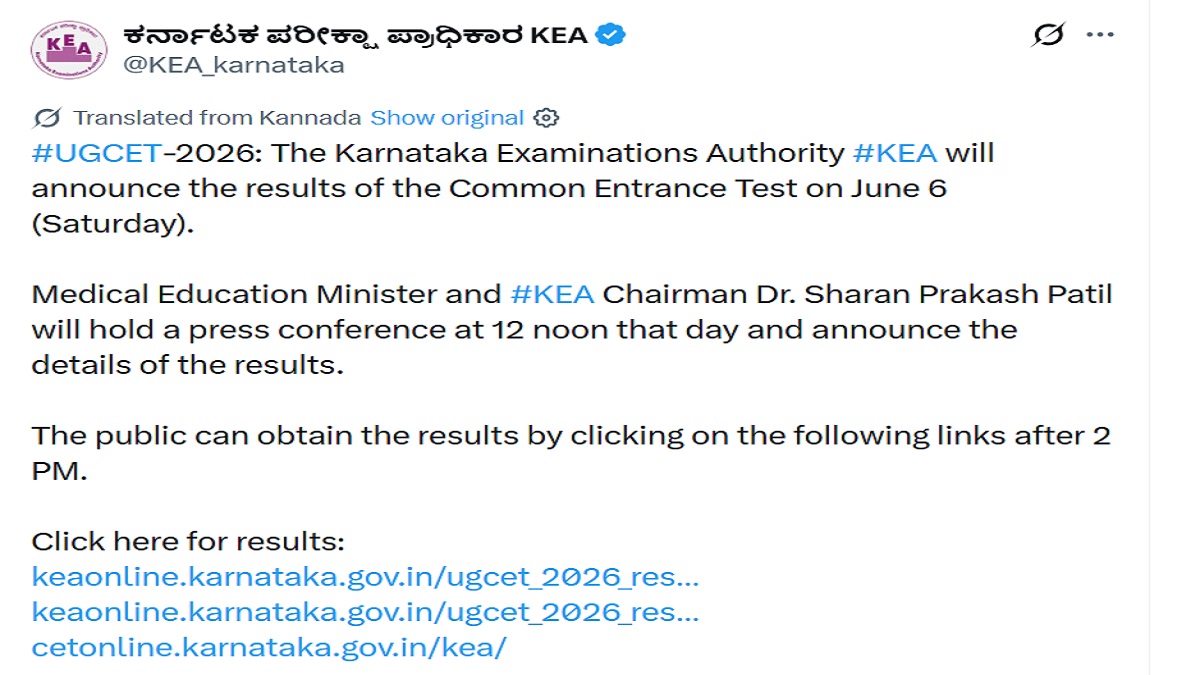
Karnataka Examination Authority has confirmed the date and time for the announcement of the KCET result. The results will be announced by the Medical Education Minister and KEA Chairman Dr Sharan Prakash Patil in a press conference at 12 noon. Link to check scorecards will be available at 2 PM.
KCET Result 2026: Karnataka Examination Authority will declare the KCET 2026 result today, June 6, 2026. The results will be announced in an official press conference at 12 Noon, following which the link to check the result will be available at 2 PM. Candidates eagerly awaiting the announcement of the results must keep their credentials ready with them to check the result and download the scorecard.
According to the official tweet, the Medical Education Minister and KEA Chairman Dr. Sharan Prakash Patil will hold a press conference at 12 noon to announce the result details. To check the results, students are required to visit the official website cetonline.karnataka.gov.in and login with the credentials.
#UGCET-2026: ಸಾಮಾನ್ಯ ಪ್ರವೇಶ ಪರೀಕ್ಷೆಯ ಫಲಿತಾಂಶವನ್ನು ಜೂನ್ 6ರಂದು (ಶನಿವಾರ) #KEA ಪ್ರಕಟಿಸಲಿದೆ.
ವೈದ್ಯಕೀಯ ಶಿಕ್ಷಣ ಸಚಿವರೂ ಅದ #KEA ಸಹ ಅಧ್ಯಕ್ಷ ಡಾ.ಶರಣ ಪ್ರಕಾಶ ಪಾಟೀಲ ಅವರು ಅಂದು ಮಧ್ಯಾಹ್ನ 12 ಗಂಟೆಗೆ ಪತ್ರಿಕಾಗೋಷ್ಟಿ ನಡೆಸಿ, ಫಲಿತಾಂಶದ ವಿವರಗಳನ್ನು ಪ್ರಕಟಿಸಲಿದ್ದಾರೆ.
ಸಾರ್ವಜನಿಕರು, ಮಧ್ಯಾಹ್ನ 2 ಗಂಟೆ ನಂತರ ಈ…
— ಕರ್ನಾಟಕ ಪರೀಕ್ಷಾ ಪ್ರಾಧಿಕಾರ KEA (@KEA_karnataka) June 5, 2026
KCET 2026 result link will be activated at 2 PM on the official website. To check the result and download the scorecard, students are required to visit the official website and log in with their hall ticket number and other credentials. Candidates clearing the Karnataka UGCET 2026 result will be eligible for the counselling process.
KCET Result 2026: Official Website to Download Scorecard
The Karnataka UGCET 2026 result link will be available on the official website. To download the scorecard, students must login with their hall ticket number. The list of websites where candidates can check their KCET Result is provided below
- keaonline.karnataka.gov.in
- cetonline.karnataka.gov.in
Steps to Doenlopad KCET 2026 Scorecard
The Karnataka CET 2026 result link will be activated at 2 PM on the official website. Once announced, candidates can login with ther credentials to download the individual scorecards. Follow the steps provided below
Step 1: Visit the official website of Karnataka CET
Step 2: Click on KCET Result 2026
Step 3: Click on login
Step 4: Enter the hall ticket number and date of birth
Step 5: The individual KCET scorecard will be displayed
Step 6: Download the scorecards for further reference
Details Mentioned on KCET Result 2026
The KCET 2026 results will be announced in a press conference at 12 Noon. After the press conference, the link for candidates to download the individual scorecards will be available. The following details will be given on the scorecard
- Candidate name
- Roll number
- Name of exam
- Subject
- Marks
- Total Marks
- Grade
- Qualifying status
KCET 2026 is an entrance exam conducted for admissions to professional courses offered in colleges in Karnataka. To secure an admission in colleges in the state, it is mandatory for candidates to clear their KCET exams. The category wise cutoff based on which admissions will be conducted will be provided along with the results. Students are advised to keep visiting the official website for updates.
Sherin is an education journalist with over 7 years of experience. Over her tenure of working with top media houses like Careers 360 and then Jagran Josh, Sherin has covered various entrance examinations liek JEE Main, NEET, CUET, GATE, etc. as well as various state board and CBSE results. Her understanding of the education ecosystem coupled with her own experience of teaching as an Assistant Professor of nearly 2 years helps her provide a comprehensive perspective to students. She has a Masters Degree in Communication from Madras Christian College. Apart from covering education news, Sherin also enjoys reading and cooking.


Comments
All Comments (0)
Join the conversation