UPSC Prelims Admit Card 2026: Download CSE Exam Hall Ticket PDF at upsc.gov.in
UPSC CSE Prelims Admit Card 2026 has been released at upsc.gov.in. Check direct download steps, exam date, hall ticket details, and important instructions here.
Show Key Points
The Union Public Service Commission has released the UPSC CSE Prelims Admit Card 2026 on its official website, upsconline.nic.in. Those candidates who have registered for the Civil Services Preliminary Examination can download their hall ticket from the UPSC official website. As per the official examination schedule, the UPSC Civil Services Prelims 2026 will be conducted on May 24, 2026, i.e., tomorrow, across multiple exam centres in India. UPSC has also sent the e-admit card to the registered email ID of the candidates. Candidates are advised to download the admit card at the earliest.
The admit card is one of the most important documents which is required on the examination day. Without the Admit Card and a valid photo ID, candidates will not be allowed to enter the examination hall. Candidates are advised to download their admit card from the official website.
UPSC Prelims Admit Card 2026: Direct Link and Steps to Download The Admit Card
As the UPSC Admit card is released, candidates can access and download the UPSC Prelims Admit card directly from the official website. Follow these simple steps to download the hall ticket PDF:-
- Visit the official website of the UPSC at upsconline.nic.in
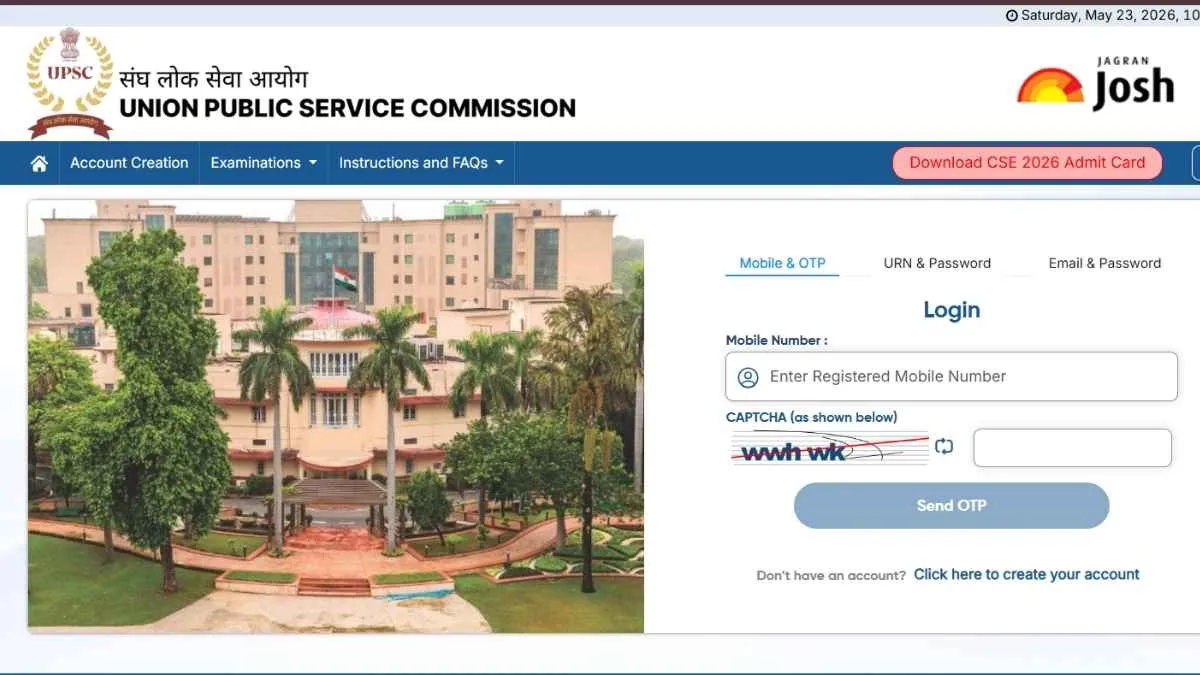
- Once directed to the homepage, on a blue-coloured tab, Download CSE 2026 Admit Card in red colour will be there, click on that.
- Candidates will be redirected to the Log In page
- UPSC offers three ways to download the Admit Card. Enter the registered mobile number, fill in the captcha, and an OTP will be sent to your number, and submit. The Admit Card will be displayed on the screen.
- The second way is by filling in the URN, Password, and the captcha, and then submit by filling in the Captcha, the admit card will be displayed on the screen.
- The third way is by entering the registered email ID and password, filling in the captcha and submitting the information. The UPSC CSE Admit Card will be displayed on the screen.
- Take out the clear printout of the Admit Card for the entrance examination.
Candidates are also advised to verify all the details carefully after downloading the admit card. Any discrepancy in name, photograph, or exam centre should be immediately reported to UPSC authorities.
UPSC Prelims Admit Card: Details Mentioned on UPSC CSE Hall Ticket 2026
The UPSC prelims admit card will contain several important details which are related to the examination, which include:-
- Candidate’s Name
- Roll Number
- Exam Date and shift timings
- Examination centre address
- Reporting Time
- Important Instructions for candidates
- Photograph and signature
Candidates are advised to reach the exam centre well before the reporting time to avoid last-minute inconvenience. Electronic gadgets, smart watches, calculators, and study material will not be allowed inside the examination venue. With lakhs of aspirants expected to appear this year, competition for the Civil Services Examination remains extremely high. Candidates should focus on revision and avoid waiting until the last moment to download the admit card.
UPSC Prelims Admit Card: UPSC Prelims 2026 Exam Day Guidelines
UPSC usually issues strict instructions for candidates appearing in the prelims examination. Aspirants should mandatorily carry:-
- Printed copy of the admit card
- Original photo identity proof
- Black ballpoint pen
- Passport-size photographs if required
Candidates should also follow all instructions mentioned on the hall ticket carefully to avoid disqualification during verification.

Pratyasha is a content writer for Jagran Josh's college section, creating educational articles for students. She holds a B.A. Honours in Ancient Indian History Culture and Archaeology from Banaras Hindu University. She enjoys mythology, fantasy books, and travelling. She can be contacted at pratyasha.chaturvedi@