UPI AutoPay: 10 Things You Can Set Up for Automatic Payments
UPI AutoPay makes recurring payments easier. Check 10 things you can set up for automatic payments, from bills and subscriptions to EMIs.
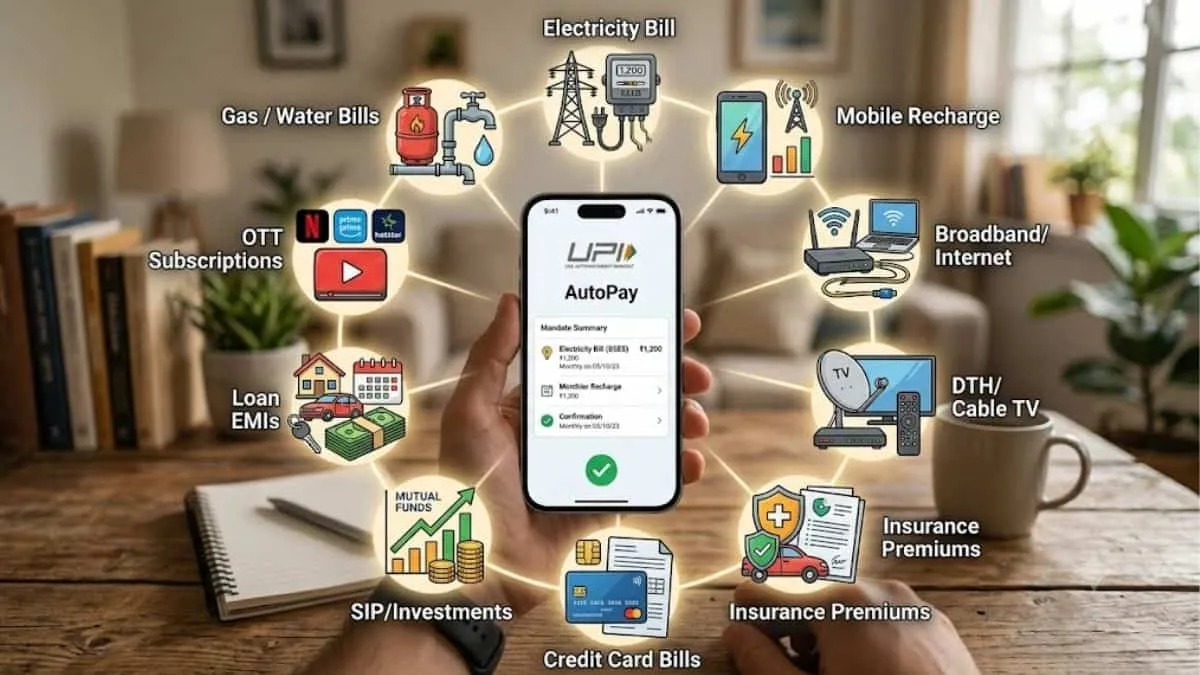
Recurring payments are quite hard to keep track of whether they are monthly, quarterly or yearly. Between rent, subscriptions, insurance premiums and EMIs, it is very common that you miss a due date and when it is missed you get penalised or your subscription based services are halted until further payment.
That is why UPI AutoPay solves this problem. This system lets you create a recurring payment mandate through your desired UPI apps . Once you set it up, your payments continue to happen automatically when it is the due date.
What is UPI AutoPay?
UPI AutoPay is a simple system that lets you create a recurring payment mandate through your UPI app. Under UPI AutoPay you just need to authorise the mandate once. However, this is subject to the rules that are set by your bank and the merchant.
After that, all the future payments that you have set up on autopay will debit automatically as per the mandate terms and you do not need to make any payments manually
What Can You Pay Using UPI AutoPay?
Here are 10 things that you can setup payments for using UPI AutoPay:
| No. | Payment/Expense | Can it be automated? |
| 1 | OTT subscriptions | Yes |
| 2 | Mobile and DTH recharges | Yes |
| 3 | Insurance premiums | Yes |
| 4 | SIP investments | Yes |
| 5 | Loan EMIs | Yes (where supported) |
| 6 | Utility bills | Yes |
| 7 | Credit card bill payments | Yes |
| 8 | Gym or fitness memberships | Yes (if merchant supports it) |
| 9 | News or magazine subscriptions | Yes |
| 10 | School or course fees | Sometimes |
How Does UPI AutoPay Work?
The process is quite simple:
-
Select a merchant or service that already supports UPI AutoPay.
-
Choose the UPI AutoPay option at the payment window.
-
Enter the required mandate details.
-
Approve and authenticate the mandate through your UPI app.
UPI AutoPay Limits: How Much Can Be Debited Automatically?
Many UPI users think that AutoPay payments have no limit however, this is not true. As per the RBI's Digital Payments E-mandate Framework of 2026, recurring payments up to ₹15,000 can be processed without extra authentication once the mandate is approved.
Further there are certain categories that get a higher limit of up to ₹1,00,000. These payments include payments like insurance premiums, mutual fund, and credit card bill payments.
If there is a transaction that goes above the applicable limit for its category, your UPI PIN is needed to approve that specific payment.
How to Check Your Active UPI AutoPay Mandates?
-
Open your UPI app.
-
Go to the Mandates, then to AutoPay, or Recurring Payments section.
-
View your list of active mandates.
-
Check the merchant name, amount, frequency and validity for each one.
-
Cancel or modify a mandate where the app or merchant allows it.
How to Cancel UPI AutoPay?
-
Open the UPI app where the mandate is set up.
-
Go to the mandate or AutoPay section.
-
Select the mandate you want to cancel.
-
Choose the cancellation option.
-
Authenticate the action as required.

Nikhil is a dedicated digital journalist and communications professional with more than five years of experience, currently working within the General Knowledge section at Jagran Josh. He has established himself as a subject matter expert in Finance, Economy, History, Technology, and Trending News, consistently delivering accurate, engaging, and easy-to-read content for a wide global audience.
Over the course of his career, Nikhil has developed deep expertise in crafting informative listicles, viral trending stories. His editorial portfolio also spans finance, historical research, and technology reporting, making him a versatile and well-rounded content professional. Every piece he produces reflects a strong balance between factual accuracy and reader engagement.



![[Out] UGC NET June 2026 Result Live: यूजीसी नेट रिजल्ट ugcnet.nta.nic.in जारी, डायरेक्ट लिंक से करें चेक](https://img.jagranjosh.com/images/2026/August/2782026/UGC-NET-Result-2026-Marksheet-link-pdf.jpg)