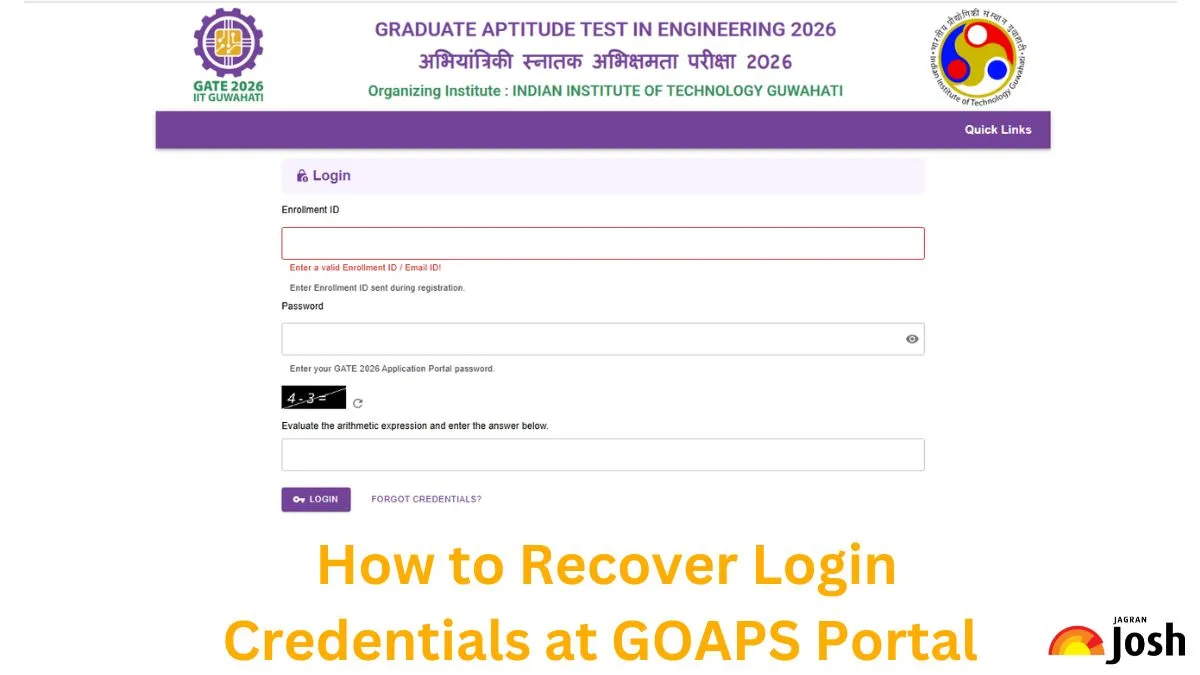
GATE 2026 Admit Card: Indian Institute of Technology (IIT), Guwahati has released the GATE Admit Card on January 13, 2026. This year, the IITG will conduct the computer-based Graduate Aptitude Test in Engineering (GATE) on February 07, 08, 14, and 15, 2026, in two sessions- a forenoon session from 9.30 am to 12.30 pm and an afternoon session from 2.30 pm to 5.30 pm. For which, the GATE 2026 Admit Card has been released on the official website of GATE 2026, i.e. gate2026.iitg.ac.in. All prospective candidates of the GATE 2026 exam can check the details about the GATE Admit Card and steps to recover login details from the GOAPS portal here.
GOAPS Admit Card 2026
IIT Guwahati will activate the link to download the GATE admit card on January 13, 2026, in online mode. The candidates must carry their admit cards on the exam day failing to do so the candidates will not be allowed to sit in the examination. Check out the key highlights regarding GATE admit card 2026.
| GATE Admit Card 2026: Overview | |
| Conducting Body | Indian Institute of Technology (IIT), Guwahati |
| Exam Name | Graduate Aptitude Test in Engineering 2026 |
| Purpose of GATE exam | Qualifying Examination for M.E./ M.Tech/ Ph.D admissions and PSU Recruitment |
| GATE Admit Card Status | Released |
| GATE Admit Card Download Start Date | January 13, 2026 |
| Mode of Exam | Online |
| February 03, 04, 10, and 11, 2026 | |
| Validity of GATE Scorecard | 3 Years from the date of release of result |
| Official Website | gate2026.iitg.ac.in |
Steps to Download GATE Hall Ticket 2026
Those aspiring to appear for GATE 2026 exam need to login to the official website through their user ID and password. The candidates need to follow the following steps to download the admit card.
Step 1: Visit the official website - gate2026.iitg.ac.in
Step 2: Open the GOAPS login portal.
Step 3: Login using the registration number and password
Step 4: The candidate’s details will be displayed on the screen.
Step 5: Click on the Download admit card link
Step 6: Download and print the Admit Card
What if a candidate forgot his GOAPS login credentials?
If a candidate forgets his/her login details, he/she needs to follow the below-mentioned steps to reset the password:
Step 1: Click on “FORGOT CREDENTIALS”.
Step 2: Enter the enrollment Id/email address and registered mobile number.
Step 3: Click on “SEND OTP”
Step 4: An OTP will be sent to the registered email address/mobile number of the candidates.
Step 5: Enter the OTP and reset the password.



Comments
All Comments (0)
Join the conversation