September Android Drop 2026: What are the 5 New Features That Make Android More Useful and Personal
September Android Drop 2026 brings 5 new features, including Remembered Items, Motion Assist, Guided Vision, Google Keep in Messages and chat themes.
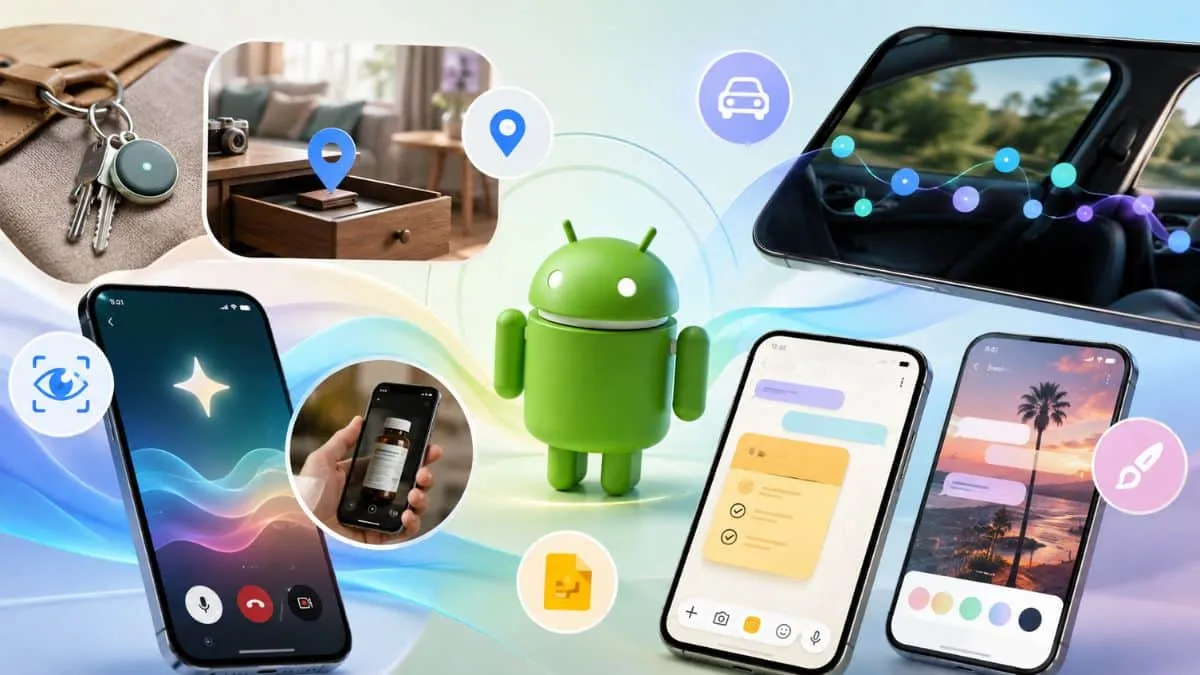
On September 1, 2026, Google announced its latest September Android Drop, bringing five new features designed to make everyday Android experiences more convenient, accessible and personalised.
The new update focuses on practical improvements, including remembering where you left important items, reducing motion sickness while using your phone in a moving vehicle, getting real-time visual assistance through Gemini Live, collaborating on Google Keep notes directly inside Google Messages, and customising individual chats with new backgrounds and themes.
Here’s everything you need to know about the September Android Drop 2026 and the new features coming to Android users.
What Is the September Android Drop?
The September Android Drop is Google's latest collection of Android features aimed at improving how people use their phones in everyday situations.
Rather than focusing only on major system changes, this update introduces smaller but useful tools that can help users stay organised, access information more easily, communicate with friends and family, and personalise their Android experience.
The September 2026 Android Drop includes five major additions:
-
Remembered Items in Find Hub
-
Motion Assist for reducing motion sickness
-
Guided vision in Gemini Live
-
Google Keep integration in Google Messages
-
Custom chat backgrounds and themes
The September Android Drop can help you keep track of important items, help reduce motion sickness, and more. Explore the new features: https://t.co/wih946e3JB
— News from Google (@NewsFromGoogle) September 1, 2026
September Android Drop 2026: Feature Availability
| Feature | What It Does | Availability |
| Remembered Items | Lets Gemini remember where you stored important belongings | Android 16+ |
| Motion Assist | Adds a moving bubble overlay designed to reduce motion sickness | Android 17 |
| Guided vision | Provides spoken visual assistance through Gemini Live | Android 9+ coming soon |
| Google Keep in Messages | Lets users create and collaborate on notes and lists inside chats | Rolling out |
| Chat theme | Adds custom backgrounds and colors to individual chats | Available now |
Note: Availability may be dependent on device, country and the availability of the relevant Google services.
September Android Drop 2026: What are the 5 New Features That Make Android More Useful and Personal?
Let's take a closer look at the 5 New Features That Make Android More Useful and Personal.
1. Gemini Can Remember Where You Put Important Items
The one feature that is more useful in the September Android Drop is the fact that you could use Gemini and Find Hub to recall where to place any important things that you place.
If you can't see a tracking tag attached to an item, then you can tell Gemini where you placed it. For example, you could say:
“Hey Google, remind me, I placed my passport in my bedroom drawer in Find Hub.”
It is also possible to add a photo to help identify the information at a later time (optional).
If you want to find the object again, you can say "Gemini, where is it?" or activate the tab "Remembered items" in Find Hub.
This could be particularly useful for things such as passports, spare keys, important documents and other belongings that are easy to misplace but don't necessarily have a tracker attached.
The feature will be available on Android 16 and above devices in countries where Gemini and Find Hub are available.
How the Remembered Items Feature Works
The procedure is fairly straightforward:
-
Give Gemini the name for something to remember.
-
Let Gemini know where you put it.
-
Add a photo (optional).
-
Later, remember to ask Gemini where the item is.
-
If you wish, verify the items you recall in Find Hub.
This makes Find Hub more than just a tagged-device-belongings-tracker.
2. Motion Assist Helps Reduce Motion Sickness
The second key feature is aimed at those that suffer from motional illness when riding in a moving vehicle with their phone.
Motion Assist creates a subtle “bubble” over the screen on Android. The bubbles respond to the movements of the car and are there to minimize the disconnection between what's happening on the screen and what's happening in the car.
The idea is to make it more comfortable when sitting in the passenger seat to use materials like reading, browsing or watching videos.
Motion Assist can be customised
The appearance of the Motion Assist bubbles can also be customized in Google, so that users can feel at ease with the app.
You can customize:
-
Bubble shape
-
Bubble color
-
Bubble opacity
You can also set the Motion Assist to automatically start or set it in the Quick Settings for instant activation.
Motion Assist is only available on phones on Android 17.
3. Guided Vision Brings Real-Time Visual Help to Gemini Live
Google is also making Gemini's usability features more accessible in its Gemini Live app, by introducing Guided vision.
The feature is designed with and for individuals with poor vision and blindness. It can control the camera of their phone and share that camera and they can hear what it's showing them.
For instance, Guided vision can be useful for:
-
The term used for reading small print on food packaging.The act of reading small print on food packaging.
-
Someone is explaining a menu in a dimly lit restaurant.A menu is being explained in a dark restaurant.
-
Identifying household objects
-
Locating specific items
-
Being able to see through the camera and understand what is happening.
Another feature is the ability to hear the guidance if the camera doesn't point in the right direction.
It can say to the user to:
-
Reframe the camera
-
Pan across an area
-
Center an object
-
Position the camera (positioning changes speeds up the animation)
This doesn't just mean describing an image, but a moving image. It can actively lead the user to obtain a more useful view.
How to access guided vision.Accessing Guided Vision in Android phone?
Users have a number of different ways to use Guided vision:
-
Accessibility shortcuts
-
The TalkBack menu
-
Gemini app settings
Guided vision will be rolling out to phones with Android 9 and above in countries supported by Gemini, Google has confirmed.
4. Create and Edit Google Keep Notes Directly in Google Messages
This is because Google Keep has been added to Google Messages in the September Android Drop, which simplifies group planning.
Users no longer need to open two apps to create and share a note within a conversation: they can do it all from the conversation itself.
For instance, if a group of friends were going on vacation, they might have a list together that would include:
-
Places to visit
-
Things to pack
-
Restaurants to try
-
Travel ideas
Likewise, families can also have shared grocery lists.
All participants in a given collaboration will be able to see, modify and add information to the note.
To create a Keep Note in Google Messages, follow these steps:
To start a note or list:
-
Start a chat in Google Messages.
-
Tap the + icon.
-
Click on Google Keep.
-
Make a note or list of your needs.
-
Get together and share directly from the conversation.
Google says the rollout of Google Keep integration in Google Messages starts on September 1, 2026.
5. Customize Individual Chats With New Themes and Backgrounds
Personalisation is the last feature.
With Chat theme in Google Messages, users can customize individual conversations with different backgrounds and colors.
A wallpaper can be selected or a personal photo can be used as the background. Google Messages can then automatically match the colors of the text-bubbles with the colors of the selected background.
Users may also manually tweak the colors to develop a look more suitable to their taste.
For instance, you can have a discussion with friends about coffee or a beach picture for a vacation group discussion.
This will allow for conversations to have their very own visual character, rather than all chats being alike.
What Can You Customise?
You can edit any of the following aspects in chat theme:
-
Chat background
-
Personal photos
-
Text-bubble colors
-
Overall conversation appearance
Google now has Chat theme available in Google Messages.

Prabhat Mishra is a Subject Matter Expert and digital journalist with an extensive background in the competitive exam landscape and over 4 years of experience in education, national and international news, and current affairs. Over his tenure with top knowledge platforms like Mentorship India, IAS BABA, IAS SARTHI, and now Jagran Josh, he has a deep understanding of government exams like UPSC and State PCS, including UP and Bihar, as he has already qualified for the UPPCS 2022 Mains and Bihar 68th Mains. With his core expertise in history, polity, geography & current affairs, he specialises in creating well-researched, aspirant-centric content and simplifying complex topics for competitive examinations.





![[Out] UGC NET June 2026 Result Live: यूजीसी नेट रिजल्ट ugcnet.nta.nic.in जारी, डायरेक्ट लिंक से करें चेक](https://img.jagranjosh.com/images/2026/August/2782026/UGC-NET-Result-2026-Marksheet-link-pdf.jpg)